Thursday, 25 August 2016

how to boost system performance

Hard drive usually fills up with junk and it needs to be cleaned up so that it can run smoothly again. IF not cleaned computer can get so slow.

To avoid this problem we need to do hard drive maintenance
• Defragmenting the drive

After some time of installing and uninstalling, files tend to get fragmented, and the computer has to search in different locations to access it.
@ Method to overcome this defragmenting

  1.  Press the start on the taskbar.
  2.  Under All Programs click on Accessories and then click on system tools
  3. Click on Disk Defragmenter.
  4. Click on the "Defragment Disk" button.

restart system.

Solution 2:-
@Repairing your hard disk-----

  1. Windows comes with an application which checks the computer for bad sectors; bad sector can slow down the computer because the hard disk has a tough time reading them.
  2. Right-Click on disk under Computer and click on Properties.
  3. Under the Tools tab, click on the Check now button.
  4. Click on "Scan for and attempt recovery of bad sectors", and then click on start.
  5. It may ask to restart the computer, if click Yes the next time computer restarts it will do a scan disk.

ENJOY


Monday, 22 February 2016

How to create ping of death attack.

The ping command is usually used to test the availability of a network resource. It works by sending small data packets to the network resource. I am using ping for creating DoS attack.

VM instance of router is running on my laptop, and i am creating dos attack from router.
Also, symantec antivirus is running on my laptop. Let test the capability of antivirus.


 You can see how antivirus mitigate DoS attack.

Saturday, 20 February 2016

How to create Wi-Fi Hotspot using command line in Windows


1)copy below command

netsh wlan set hostednetwork  mode=allow ssid=anoop  key = anoop

ssid is wifi network name and key is password.

2) shear the data with new virtual adapter.


3)  copy below command in CMD.

netsh wlan start hostednetwork anoop

4) copy below command in CMD to verify the client connection.

netsh wlan show hostednetwork


Saturday, 13 February 2016

Now right-click in the bottom left of your screen, to launch an administrative command prompt.
use below command to cretae wifi network name and password.
netsh wlan set hostednetwork mode=allow ssid="anoop" key="anoop"
Now you are ready to start broadcasting your network:
netsh wlan start hostednetwork
The last command will tell you  number of clients connected to your network:
netsh wlan show hostednetwork


after that share the the network with below procedure.


Tuesday, 22 December 2015

Solving Linux Dual Boot Problems With Windows 10

if you just upgraded to Windows 10 from Windows 8.1 or Windows 7 and also have a partition with Ubuntu installed, then Grub will no longer appear on the boot menu. So, here is the solution to solve this problem
There are two methods to repair the GRUB. One is by using Windows and another is by Ubuntu.
Method 1: Repairing it from Windows
You can either repair it from Windows 10 or run boot-repair from an Ubuntu live USB. These methods are also valid for Windows 8 or 8.1. Repairing from Windows 10
STEP 1:
After dual booting or upgrading, login into Windows and go to Command Prompt. Right click on it to run it as administrator.
windows-grub
STEP 2:
Type the command given below:
bcdedit /set {bootmgr} path \EFI\ubuntu\grubx64.efi
STEP 3:
Restart and you will get your Grub menu screen.
Method 2: Repairing it from Ubuntu
After following the above method if you still don’t get the grub menu, then you need a live Linux distribution either on a CD/DVD or on a USB stick.
STEP 1:
Use Boot-Repair to reinstall grub with all the options you need or boot into your live Linux distro and open GParted or any other partition manager it has. Look for your Ubuntu system partition which is in the form dev/sdxn, in our case /dev/sda7.
STEP2:
Login as root into your system to execute the actions needed to fix the issue. Open the terminal, log in as root and mount Ubuntu partition. Replace /dev/sda7, and ext4 filesystem with your partition and file system.
sudo su
cd /
mount -t ext4 /dev/sda7 /mnt
mount -t proc proc /mnt/proc
mount -t sysfs sys /mnt/sys
mount -o bind /dev /mnt/dev
STEP3:
If your /boot directory is on a different partition from your /, you’ll also need to mount that partition with the following command:
mount -t ext4 /dev/sda2 /mnt/boot
STEP 4:
Now it’s time to move into the mounted system, which is your Ubuntu installation:
chroot /mnt /bin/bash
STEP 5:
If it returns the error chroot: cannot run command ‘/bin/bash’: Exec format error, this usually indicates that you booted with one architecture (e.g. 32bit) and are trying to chroot into another (e.g. x86_64), so you need to use a Live that has the same architecture.
At this point it is useful to add a remainder to the prompt:
source /etc/profile
export PS1=”(chroot) $PS1”
And make sure /etc/mtab is up to date:
grep -v rootfs /proc/mounts > /etc/mtab
STEP 6:
Change UEFI boot order. Here the point is to change the order in which UEFI boots the system. First of all, have a look at the current order:
efibootmgr -v
This will output something like this:
BootCurrent: 0005
Timeout: 0 seconds
BootOrder: 2002,0004,0000,0001,2003,2001
Boot0000* ubuntu HD(2,e1800,82000,0a543b96-7861-11e2-8d38-d60b12dec0bc)File(EFIubuntushimx64.efi)
Boot0001* Ubuntu HD(2,e1800,82000,0a543b96-7861-11e2-8d38-d60b12dec0bc)File(EFIubuntugrubx64.efi)RC
Boot0002* EFI Network 0 for IPv6 (7C-05-07-9C-F6-18) ACPI(a0341d0,0)PCI(1c,2)PCI(0,0)MAC(7c05079cf618,0)030d3c000000000000000000000000000000000000000000000000000000000000000000000000000000004000000000000000000000000000000000RC
Boot0003* EFI Network 0 for IPv4 (7C-05-07-9C-F6-18) ACPI(a0341d0,0)PCI(1c,2)PCI(0,0)MAC(7c05079cf618,0)IPv4(0.0.0.0:00.0.0.0:0,0, 0RC
Boot0004* Windows Boot Manager HD(2,e1800,82000,0a543b96-7861-11e2-8d38-d60b12dec0bc)File(EFIMicrosoftBootbootmgfw.efi)WINDOWS………x…B.C.D.O.B.J.E.C.T.=.{.9.d.e.a.8.6.2.c.-.5.c.d.d.-.4.e.7.0.-.a.c.c.1.-.f.3.2.b.3.4.4.d.4.7.9.5.}………………..
Here you can identify the names of the devices and operating systems that are recognized by UEFI. You can find the signed bootloader for Ubuntu, the component responsible for loading grub.
How can we achieve this? By simply typing the following command into our terminal:
efibootmgr -o 0000

Tuesday, 1 December 2015

7 Best Apps to Root your Android Smartphone

Greenify
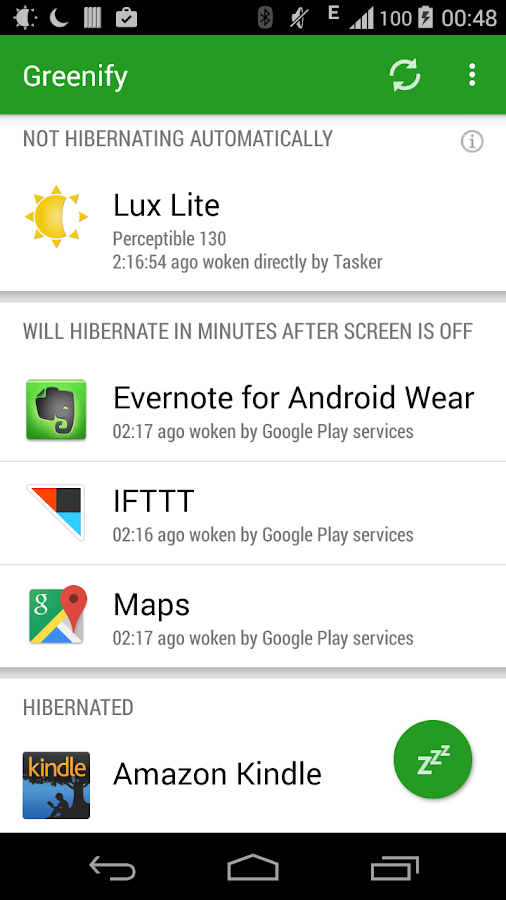
Greenify help you identify and put the misbehaving apps into hibernation when you are not using them, to stop them from lagging your device and leeching the battery, in a unique way! They can do nothing without explicit launch by you or other apps while still preserving full functionality when running in the foreground.
Quick Boot (Reboot)
Quick Reboot, can use to reboot into bootloader, recovery, or download mode. It is easy to boot your device in recovery mode with this app rather than shutting down your device, holding the required buttons, and rebooting again.
 SDFix

SDFix is a system modifier tool that helps those running Kit Kat and Lollipop overcome the dreaded locked-down SD card problem. NextApp SDFix restores this ability by modifying a configuration file. As this app changes a system configuration file, it requires root access.
SuperSU

Most root methods have you installing this app anyway so most new root users already have it.  It’s simple to use and frequently updated to support new devices and changes in how root works.
Tasker
This powerful application can make your phone do pretty much anything whenever you need it to. You create a task or a scene, then you define what those tasks and scenes do.
Titanium Backup
By this application, you can uninstall bloatware, freeze apps, and backup your applications and application data.   This includes all protected apps & system apps, plus external data on your SD card. You can do 0-click batch & scheduled backups
Xposed Framework

Xposed Framework  can be replaced your current ROM to enhance your default root experience. You can  do various things like theming, UI and performance tweaks, visual modification, button remapping, and much, much more.